 JP-MiniSynth
The keys of JP-MiniSynth
Shape sound with
how deep you press.
The keys of JP-MiniSynth read not only how fast you press, but where the key is right now. Here is how finger depth becomes sound.
Why
Every position, from top to bottom.
A typical keyboard reads speed from the time between two contacts closing.
JP-MiniSynth uses switches with a magnet inside, and a sensor below reads the magnetic field. With no contacts, every position from the first touch to the bottom can be read.
Reading
All 17 keys, read all the time.
Each key has its own magnet and Hall sensor. The ESP32-S3 reads the sensors and works out the depth of each key.
Hold a key still and the reading barely moves.
Response
The further you press, the more it changes.
A magnetic field gets stronger rapidly as the magnet comes closer. So the value is converted into actual key travel, which lines the response up with the depth your finger feels.
Try it
Move the depth
Move the slider to see how the value changes as a key goes down.
Key travel in millimetres is calculated.
Depth-played sounds such as SWELL PAD begin at about 0.5 mm and reach full at about 3.0 mm, so you get the full sound without having to bottom out.
Playing
At the bottom, the full sound.
A key stops at the bottom, and pressing harder barely changes the reading. So the bottom is the sound as designed, and lifting softens it.
The style belongs to each sound and switches automatically when you pick one: Strike for sounds played like a keyboard, Depth for sounds you want to sing.
Chords
One note of a chord.
Ordinary aftertouch sends one value to all the notes. JP-MiniSynth applies each key's depth only to that key's note, so you can hold C, E and G and lift just the E.
Try it
Move three fingers
Bar height is a rough guide to strength. Left: one value (the deepest key) goes to every note. Right: how JP-MiniSynth works.
Sounds
Which sounds change, and how.
What depth changes is set per sound. 20 of the 39 sounds use Depth. All of them play as designed at the bottom.
| Sound | When lifted | Effect |
|---|---|---|
| SWELL PAD, WARM PAD, CHOIR AH | Quieter and darker | Swell each note of a chord |
| BOW STRINGS, STR+LEAD | Quieter and darker | Bow-like phrasing |
| SYNTH BRASS, BRASS | Quieter and darker | A breathy rise |
| STRAIGHT, SHINY LEAD, SUPER SAW | A little quieter, much darker | A lead that sharpens as you press |
| GYUN LEAD, SOFT LEAD | A little quieter, darker | Plus vibrato at the very bottom |
| SYNC LEAD, DEPTH SYNC | The metallic growl softens | Growls harder the deeper you go |
| BEND KEYS (Strike) | Only the slowly lifted note bends down | Bend one note of a chord |
Depth sounds respond to how deep you press rather than how hard you play. EP KEYS, GLASS BELL, basses, organ and ARP sounds respond to how hard you play.
Calibration
Measured key by key.
The distance between magnet and sensor differs slightly from key to key. So the instrument measures the rest and bottom of each key and stores them. The values stay through firmware updates.
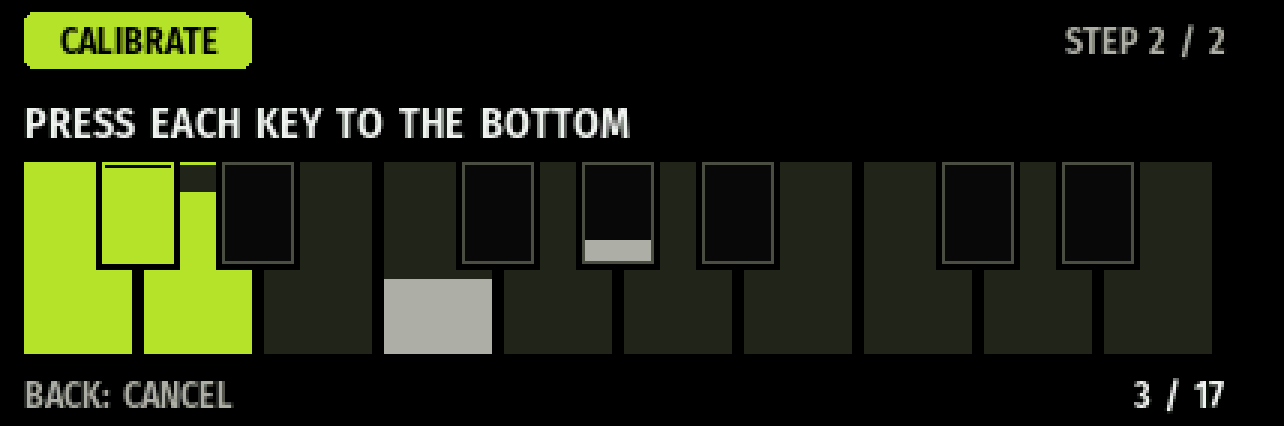
- Turn SHIFT on and hold BACK for 2 seconds
- Release all keys, then press ENTER
- Press each of the 17 keys to the bottom
- Release them all and press ENTER to save
Measured
Measured on the prototype.
| Item | Value |
|---|---|
| Full range | About 1,590 counts (12-bit) |
| Variation with a key held still | 1–5 counts |
| Holding a mid position | Where the note sounds, held 3 s: 0.1–0.8% variation. Shallow, held 2.4 s: 4–7% |
| Past the bottom | About 3% of the range or less (not used for sound) |
| Between keys | Up to about 9% in bottom value (4 keys measured; evened out by calibration) |
Measured on one prototype in development. Key travel in millimetres is calculated.